
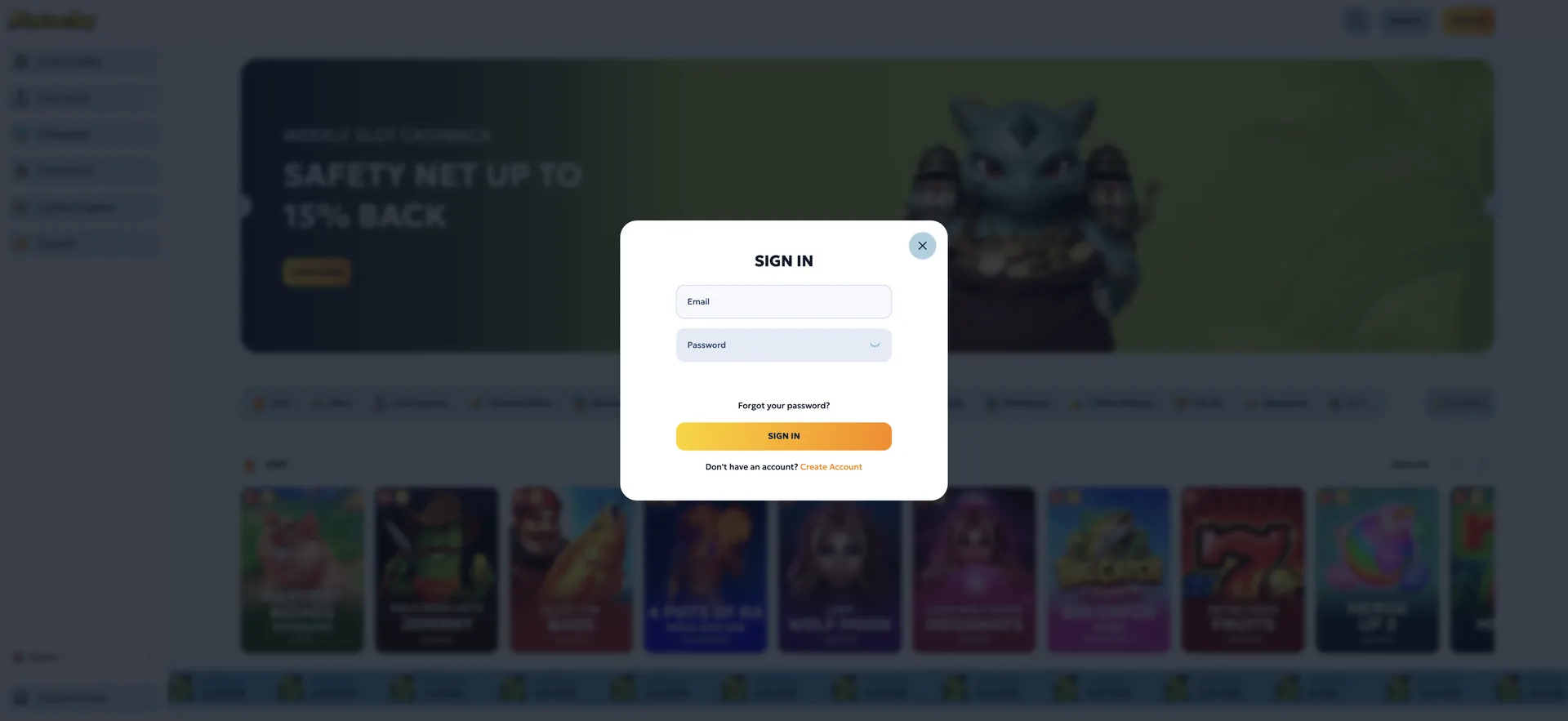
To complete the Slotochu login, click the Sign In button in the top-right corner of slotochuu.uk, enter the email address and password used at registration and press Sign In. The same form works on desktop, in mobile browsers and in the Slotochu app. If the password is lost, the "Forgot your password?" link in the same window sends a reset link by email, and the whole process takes about 30 seconds. If login still fails - for example because the email is not recognised, the account is locked or a VPN is active - 24/7 live chat and [email protected] can restore access after checking the player's identity.
The account is protected by SSL encryption and the casino's anti-fraud checks. Logging in from several accounts on one device or IP address, sharing access with another person and using a VPN are all prohibited by the terms and can lead to restrictions, so it is worth keeping to one account and a normal connection.
| Login essentials | Details |
|---|---|
| Where to log in | Sign In button, top-right corner of every page |
| Login method | Email address and password |
| Password reset | "Forgot your password?" link - reset email in about 30 seconds |
| New account | "Create Account" link under the Sign In button |
| Device support | Desktop browsers, mobile browsers, Slotochu app |
| Session security | SSL encryption and anti-fraud monitoring |
| When verification appears | On request, usually before the first withdrawal |
| Currency | GBP for UK accounts |
| Support | 24/7 live chat and [email protected] |
How to log in to Slotochu
The sign-in window opens as a pop-up over the current page, so there is no need to leave the lobby or a game category. It contains two fields - Email and Password - a link to reset the password and a link to create a new account.
Step-by-step Slotochu login
Signing in takes under a minute and works the same way on every device.
- Open slotochuu.uk in a browser or launch the Slotochu app.
- Click Sign In in the top-right corner, next to the search icon.
- Enter the email address used during registration.
- Type the password; the eye icon in the field shows the characters to check for typos.
- Press the yellow Sign In button.
- Once the balance appears in the header, the account is ready to use.
Create an account if you do not have one
If the email is not registered, the login will not work - a new account is needed. The "Create Account" link at the bottom of the sign-in window opens the registration form directly.
Quick registration flow
Registration and login use the same email, so the details entered here become the login details.
- Click Create Account in the sign-in window or Sign Up in the header.
- Fill in the form with accurate personal details and a strong password.
- Confirm the creation of the account.
- Check the inbox for the welcome email.
- Make the first deposit with code SPARK to claim 100% up to £500 + 300 free spins.
Secure login practices
The Slotochu sign-in form relies on email and password, so the strength of those two details matters most. A few habits keep the account and the balance safe.
- Use a unique password that is not used for email or other casino sites.
- Protect the email account itself, since password resets are sent there.
- Log out after playing on a shared or public device.
- Do not save the password in a browser on a shared computer.
- Never share login details - the terms forbid giving third parties access to the account.
- Sign in only at slotochuu.uk or from the official app.
Slotochu password recovery
A forgotten password is the most common reason for a failed login. Slotochu resets it by email, and the casino states the process takes about 30 seconds.
Reset steps
The reset starts from the same pop-up used for login.
- Click Sign In in the header.
- Select Forgot your password? under the password field.
- Enter the registered email address and submit the request.
- Open the email and follow the link to set a new password.
- Return to the site and sign in with the new password.
If the email does not arrive or the player no longer has access to the mailbox, support can reset the password manually via live chat or [email protected] after confirming the player's identity.
Slotochu mobile login
On phones and tablets, the Sign In button stays in the top-right corner of the mobile site, and the form is identical to desktop. The Slotochu app, installed through the Download App button in the sidebar, uses the same email and password.
Tips for mobile
A few settings make mobile sign-in quicker without reducing security.
- Add the site to the home screen or install the app to skip typing the address.
- Use the phone's password manager rather than a notes app.
- Switch from mobile data to Wi-Fi, or the other way round, if the form does not submit.
- Turn off any VPN or private relay before signing in.
Troubleshooting common Slotochu login errors
Most login problems have a simple cause. The sections below cover the usual ones and how to fix them.
Incorrect email or password
The most frequent error comes from a typo, an extra space or the wrong email address.
- Use the eye icon to check the password before submitting.
- Check for Caps Lock and the correct keyboard layout.
- Try other email addresses that may have been used at registration.
- Reset the password if the error repeats.
Browser or cache issues
If the pop-up opens but does not respond, or the session ends right after signing in, stored browser data or an extension is usually the cause.
- Clear the cache and cookies, then reload the page.
- Disable ad blockers and script-blocking extensions for the site.
- Try another up-to-date browser such as Chrome, Safari, Firefox or Edge.
Verification or reset email not received
Emails from the casino sometimes land in spam or promotions folders.
- Check the spam, junk and promotions folders.
- Wait a few minutes before requesting another email.
- Ask live chat to resend the email if it still does not arrive.
Account blocked or restricted
Access can be limited for reasons set out in the general terms. In each case, only support can review and lift the restriction.
- VPN use - prohibited by the terms.
- Duplicate accounts - an IP overlap between accounts can lead to closure.
- Pending verification - the account may be limited until documents are checked.
- Dormancy - accounts inactive for 180 days are classed as dormant and can be reactivated through support.
- Self-exclusion - accounts excluded at the player's request stay closed for the chosen period.
What you access after Slotochu login
Once signed in, the header shows the balance and a deposit button, and the profile menu gives access to all account tools.
- My Balance: real-money and bonus balances, and deposit status.
- Cashier: deposits with promo codes and withdrawal requests.
- My bonuses: activation of deposit bonuses, free spins, cashback and loyalty rewards.
- Verification: document upload for KYC.
- Loyalty Program: current level, points and next reward.
- Game history: including any unfinished rounds.
Account verification (KYC)
Verification is not part of login, but it affects what a logged-in player can do. Slotochu can request documents at any time and usually does so before the first withdrawal. Documents are uploaded in the verification section of the profile by choosing the document type and attaching clear photos or scans.
Typical documents are a passport, driving licence or national ID card, proof of address such as a recent utility bill or bank statement, and, if requested, proof of the payment method. Checks usually take up to 24 hours. Completed verification is also required for the Birthday Gift.
FAQ about Slotochu login
Answers to the questions players ask most often about signing in.
Where is the Slotochu login button?
In the top-right corner of every page, labelled Sign In, next to the search icon and the Sign Up button.
Can I log in with a phone number?
No. The sign-in form accepts only the email address and password used at registration.
How do I reset my Slotochu password?
Click Sign In, choose "Forgot your password?", enter the email and follow the link in the message. It takes about 30 seconds.
Does Slotochu login work on mobile?
Yes, in any mobile browser and in the Slotochu app, with the same email and password.
Why is my Slotochu account blocked?
Common reasons are VPN use, duplicate accounts, pending verification or 180 days of inactivity. Contact live chat to check the status.
Can I have two Slotochu accounts?
No. Only one account per person is allowed, and duplicate accounts can be closed with their winnings removed.
How do I contact support if I cannot log in?
Live chat is available 24/7 without signing in, or email [email protected].