
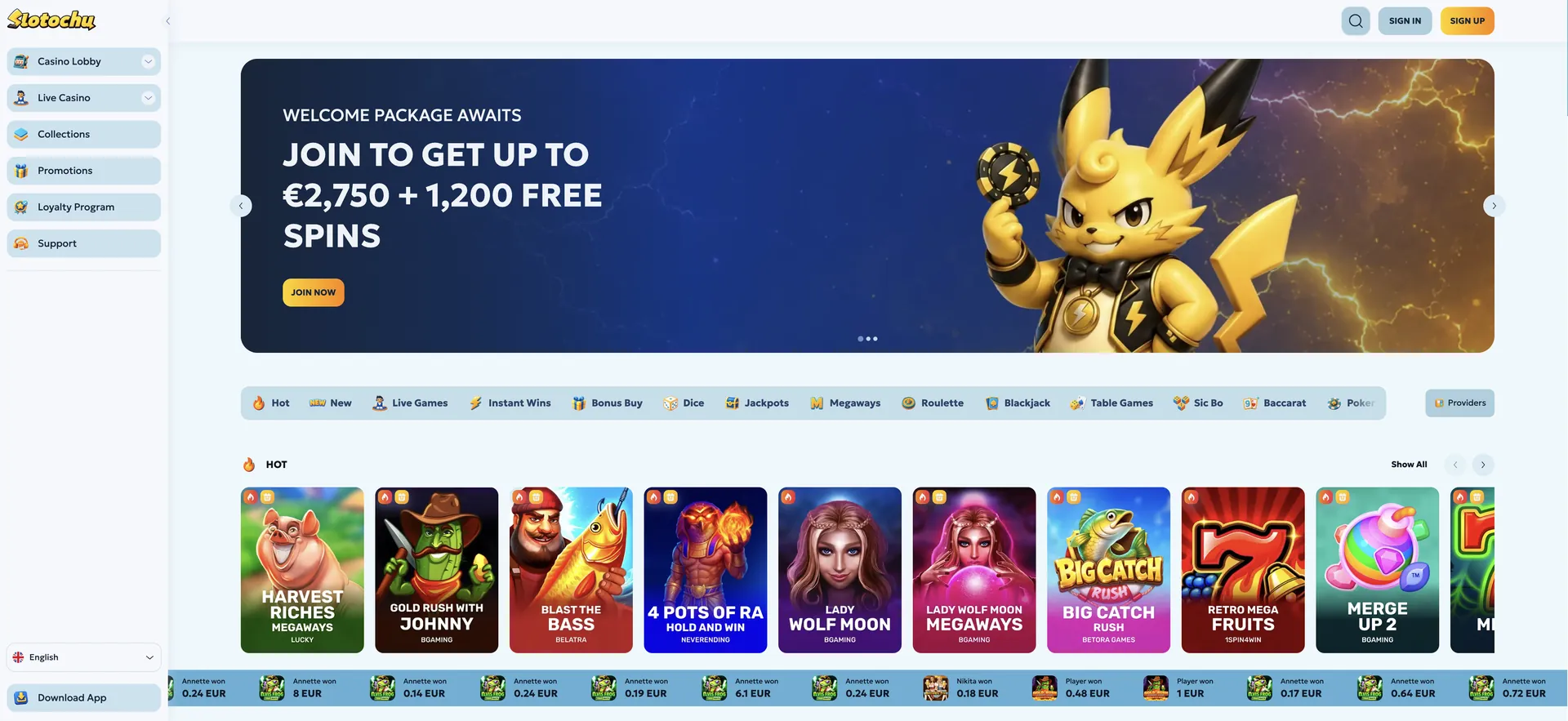
Yes, there is a Slotochu app: it is installed from the Download App button at the bottom of the site's left sidebar, not from the App Store or Google Play, and the casino's FAQ confirms it can be installed on the device. Players who prefer not to install anything get the same features in any mobile browser on iOS or Android - all 14,134 games, the GBP cashier with deposits from £20, every bonus code and 24/7 live chat - and can add the site to the home screen for one-tap access. Login details, balance and active bonuses are shared across the app, the mobile site and desktop.
Because the app comes from the casino's own site, it is not reviewed by Apple or Google, and download links found elsewhere should be avoided. This guide covers both mobile options, how to set each up and what to expect on a phone or tablet.
| Feature | Slotochu on mobile |
|---|---|
| App source | Download App button on slotochuu.uk |
| App Store / Google Play | Not listed on the site |
| Browser access | Safari, Chrome, Firefox and other modern browsers |
| Home screen shortcut | Available on iOS and Android |
| Game catalogue | 14,134 titles - identical to desktop |
| Live casino | 849 live tables streamed on mobile |
| GBP deposits and withdrawals | Full cashier, from £20 |
| Bonuses | All promo codes, "My bonuses" tab, cashback, Loyalty Program |
| Verification | Document upload from the phone camera |
| Support | 24/7 live chat and email |
| Security | SSL encryption - same as desktop |
Is there a Slotochu casino app for Android or iOS?
Slotochu provides its own app through the Download App button in the sidebar, which is visible on every page of the site. The site does not link to App Store or Google Play listings, so installation happens directly from slotochuu.uk by following the prompts on screen. The FAQ describes the app as an option for more convenient play alongside the mobile browser version.
The app and the browser version run on the same platform, so there are no app-only games or app-only bonuses. The choice between them comes down to convenience: the app opens from its own icon, while the browser version needs nothing installed.
How to install the Slotochu app
The installation starts on the casino site itself. Using the official address is important, as copies of the app from other sources cannot be checked.
- Open slotochuu.uk in the phone's browser.
- Open the menu to show the left sidebar.
- Tap Download App at the bottom of the sidebar.
- Follow the installation prompts that appear on screen.
- Open Slotochu from the new icon and sign in with your email and password.
How to access Slotochu in a mobile browser
The mobile site adapts the desktop layout to small screens: the sidebar collapses into a menu, and the category bar becomes a scrollable row. Getting started takes a few taps.
- Open Safari, Chrome or another browser and go to slotochuu.uk.
- Tap Sign In or Sign Up in the top-right corner.
- Use the category row or search to find a game.
- Open the cashier to deposit, entering a promo code if you want a bonus.
How to add Slotochu to your home screen
A home screen shortcut gives app-like access without installing anything. It opens the site in one tap and takes almost no storage.
iOS instructions (Safari)
On iPhone and iPad, the shortcut is created through Safari's share menu.
- Open slotochuu.uk in Safari.
- Tap the Share icon (the square with an upward arrow).
- Scroll down and tap Add to Home Screen.
- Keep the name "Slotochu" or change it, then tap Add.
- Launch the casino from the new icon.
Android instructions (Chrome)
On Android phones and tablets, Chrome adds the shortcut from its main menu.
- Open slotochuu.uk in Chrome.
- Tap the three-dot menu in the top-right corner.
- Choose Add to Home screen.
- Confirm the name and tap Add.
- Open the casino from the icon on the home screen.
Features available in the Slotochu app and mobile site
Everything available on desktop is available on mobile. The main sections work as follows.
- Games: all 14,134 titles, including 5,370 Bonus Buy slots, 3,039 jackpot games and 288 instant wins such as Air Jet and Crash.
- Live casino: 849 tables from Evolution, Ezugi, Vivo Gaming, LuckyStreak, Live Vegas and others.
- Search and filters: search, category row, provider list and the Random game picker.
- Promotions: welcome package up to £2,750 + 1,200 FS, weekly reloads and cashback.
- Account: balance, "My bonuses", verification, game history and Loyalty Program progress.
- Support: live chat from the sidebar and the FAQ section.
Slotochu performance on mobile
Games are built in HTML5 and load directly in the app or browser without plugins. Speed depends mainly on the device and the connection rather than on the choice between app and browser.
- Lobby: categories show a counter and load in batches of 24 games with a Show More button, which keeps large sections such as Bonus Buy manageable on a small screen.
- Slots: the same versions as on desktop, from providers such as BGaming, Spinomenal, Red Tiger Gaming and Hacksaw Gaming.
- Live casino: live streams need a stable connection; Wi-Fi or a strong 4G/5G signal is recommended.
- Interrupted rounds: if the connection drops, the round is normally completed on the server and winnings are credited automatically.
Mobile payments and withdrawals in GBP
The cashier on mobile offers the same methods and limits as on desktop. Apple Pay is especially convenient on iPhone, but like paysafecard and Sofort, it works for deposits only - withdrawals go to bank transfer or crypto.
| Method | Deposit | Withdrawal | Limits |
|---|---|---|---|
| Apple Pay | Yes | No | £20 - £4,000 |
| paysafecard | Yes | No | £20 - £1,000 |
| Sofort | Yes | No | £20 - £4,000 |
| Bank transfer | Yes | Yes | £20 - £4,000 |
| USDT, BTC, ETH, USDC, TRX and other crypto | Yes | Yes | Withdrawals £20 - £4,000 |
Account-level withdrawal limits of £500 per day, £2,000 per week and £7,000 per month apply on every device.
Security of the Slotochu app and mobile version
Connections to Slotochu are protected by SSL encryption on both the app and the mobile site, and the same anti-fraud checks apply as on desktop. To keep the account safe on a phone, install the app only from the Download App button on slotochuu.uk, lock the device with a PIN or biometrics, and avoid saving the password on shared devices. VPN use is prohibited by the terms, including on mobile.
Mobile usage tips for UK players
A few habits help when playing on a phone in the UK.
- Keep the account in GBP to avoid currency conversion by the bank.
- Use Wi-Fi for live casino to save mobile data.
- Photograph ID and proof of address in good light before uploading them for verification.
- Activate free spins in "My bonuses" each day - welcome spins arrive in five daily sets.
- Turn on notifications for email so reset links and offers are not missed.
FAQ about the Slotochu app
Short answers about playing Slotochu on a phone or tablet.
Is there a Slotochu app?
Yes. It is installed from the Download App button in the site's sidebar. The site can also be used in any mobile browser.
Is the Slotochu app on the App Store or Google Play?
The site does not link to store listings. The official source is the Download App button on slotochuu.uk.
Are there app-only bonuses?
No. The app, mobile site and desktop share the same promotions, codes and Loyalty Program.
Can I claim the welcome bonus on mobile?
Yes. Enter SPARK in the deposit field on the first deposit of £20 or more and activate the bonus in "My bonuses".
Can I withdraw through the Slotochu app?
Yes, to bank transfer or crypto, with the same £20 minimum and limits as on desktop.
Does live casino work on mobile?
Yes. All 849 live tables are available and adjust stream quality to the connection.